Key Takeaways:
- Overcoming “Basement Blindness”: How to see past the concrete walls and exposed pipes to find the hidden potential of your home’s lower level.
- The Lighting Lab: Using AI to experiment with lighting temperatures (2700K vs 4000K) to ensure your windowless space feels bright and airy.
- Structural Solutions: Visual strategies for hiding support poles, low ductwork, and utility meters without losing ceiling height.
- Risk-Free Design: How to use AI basement design free tools to test bold ideas-like dark moody walls or industrial ceilings-before spending a penny.
Introduction: The Forgotten Square Footage
We all have that one door in the house. The one we close quickly when guests come over. Behind it lies a flight of wooden stairs leading down into the “underworld” of our home-the basement.
Think of your basement as a blank canvas-an unfinished space brimming with potential and ready to be transformed into anything you can imagine.
For many homeowners, the basement is a paradox. It represents a massive amount of square footage-often the same footprint as the entire first floor-yet it serves as nothing more than a glorified storage unit for holiday decorations, outgrown clothes, and that exercise bike we swore we’d use. It is valuable real estate, wasted.
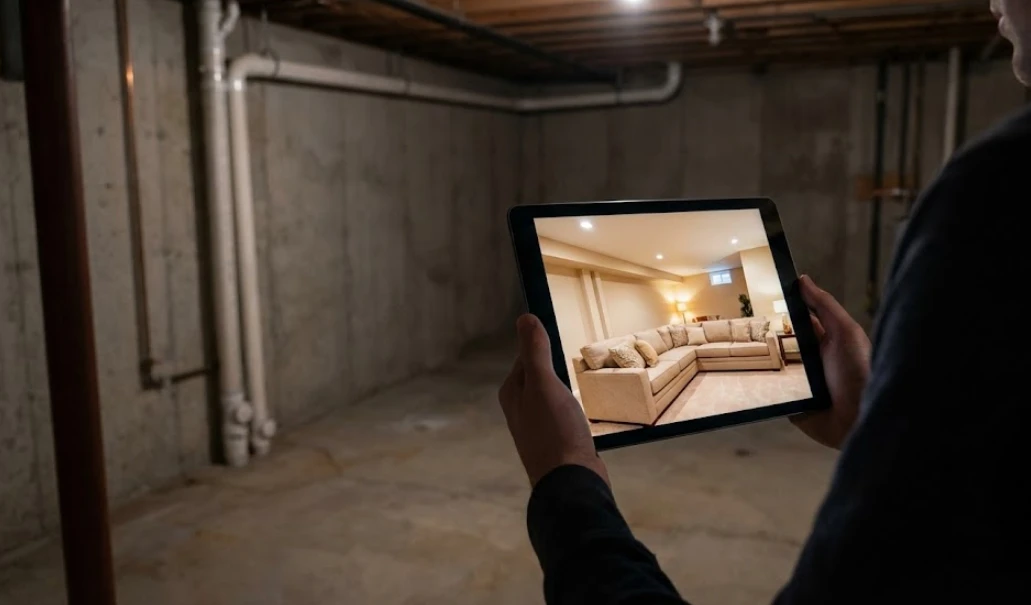
Why do we hesitate to reclaim this space? usually, it’s not just the budget; it’s the lack of vision. Standing in your current basement-a cold, concrete box with low ceilings, dim lighting, and a furnace humming in the corner-it is incredibly difficult to imagine a cozy family sanctuary. We suffer from “Basement Blindness.” We see the obstacles (the pipes, the poles, the dampness), not the possibilities.
But what if you could snap your fingers and see the finished result instantly? What if you could peel back the gloom and see a bright playroom, a moody home theater, or a serene guest suite?
This is no longer science fiction. With the advent of AI basement design technology, DIY enthusiasts and homeowners can now visualize the potential beneath their feet with photorealistic accuracy. These tools not only act as a bridge between the cold reality of concrete and the warm promise of a finished home, but also provide inspiration by showcasing a variety of styles and layouts to help you reimagine your basement. In this guide, we will explore how to use these tools to conquer the unique challenges of basement design and finally shine a light on your home’s hidden gem.
The Unique Challenge of “Below Grade” Design
Designing a basement is fundamentally different from designing a living room or a bedroom. You are working “below grade,” which brings a specific set of constraints that can paralyze your decision-making. Defining the intended functions of your basement-such as entertainment, storage, or a home office-is a crucial first step to ensure the space meets your needs.
Planning the basement layout is essential to address these unique challenges, as it helps visualize space arrangements and furniture placement for optimal usability.
The task of transforming a basement involves a series of steps, but with AI tools, each task-from layout planning to feature customization-can be simplified and streamlined.
The Lighting Deficit
The most obvious challenge is the lack of natural light. Most basements have small “hopper” windows, window wells, or no windows at all.
- The Fear: “If I paint the walls a color I love, will it make the room feel like a cave?”
- The AI Solution: AI tools allow you to simulate artificial lighting scenarios. You can see how a “Warm White” (3000K) scheme creates a cozy vibe versus a “Daylight” (5000K) scheme that mimics the sun. You can test recessed lighting layouts to ensure there are no dark corners. AI basement design platforms also let you experiment with different color palettes, helping you visualize which hues and combinations work best in low-light environments.
The “Ugly” Infrastructure
Basements are the mechanical heart of the house. You have HVAC ductwork dropping the ceiling height in random places, lally columns (support poles) interrupting the open flow, and water meters sticking out of walls.
- The Fear: “How do I layout furniture around a pole right in the middle of the room?”
- The AI Solution: You can digitally “build” soffits to hide ducts or wrap columns in wood/brick textures to turn them into architectural features. Visualization helps you decide: should you hide the infrastructure, or embrace an “Industrial Loft” aesthetic with exposed black pipes? Design software uses symbols to represent features like columns, ducts, and meters, making it easier to visualize and organize these elements in your basement plan.
The Texture Problem
Concrete floors and cinder block walls are cold and uninviting.
- The Fear: “Will vinyl plank flooring feel too cold? Do I need carpet?”
- The AI Solution: Instantly swap flooring materials. Compare the look of plush wall-to-wall carpeting against LVP (Luxury Vinyl Plank) with a large area rug.
Once the flooring and walls are addressed, selecting and arranging furnishings is essential to make the basement feel comfortable, cohesive, and personalized.
Mastering the Mood: Style Directions for Basements
Because basements are often separated from the rest of the house, they offer a unique opportunity to experiment with styles you might be too scared to try in your main living room. With this flexibility, your basement can be transformed into your dream space-a personalized, functional, and stylish environment that reflects your aspirations and creativity.
1. The “Cozy Farmhouse” Retreat
This is a favorite for Shine Your Light readers. It focuses on warmth.
- AI Prompts to Try:“Shiplap walls, whitewashed wood ceiling, barn doors covering storage, beige sectional sofa, warm ambient lighting, rustic wood beams.”
- Why it works: The white walls bounce light around, combating the basement darkness, while the wood textures add the warmth that concrete lacks. This style is ideal for a lifestyle centered on relaxation and family gatherings.
2. The “Moody Speakeasy” Lounge
Since the space is naturally dark, why not lean into it?
- AI Prompts to Try:“Dark charcoal walls, velvet furniture, brass accents, dim sconce lighting, wet bar, exposed brick wall, tin ceiling tiles.”
- Why it works: Instead of fighting the lack of light, you embrace it to create an intimate, cinematic atmosphere. This style is a perfect match for basements with limited natural light and is ideal for media rooms.
3. The “Industrial Loft”
The budget-friendly choice that looks high-end.
- AI Prompts to Try:“Exposed ceiling painted black, polished concrete floors, large area rugs, metal shelving, track lighting, modern furniture.”
- Why it works: It saves money on drywalling the ceiling. AI can show you if painting the exposed pipes black looks “chic” or “unfinished” in your specific space. This style is especially effective for transforming an unfinished basement into a trendy, functional area.
How to Use “AI Basement Design Free” Tools Effectively
There are many tools on the market, but for the DIYer, cost is always a factor. You are likely searching for AI basement design free solutions to get started. While a free version may have some limitations compared to professional architectural software, it still offers essential features for beginners and is incredibly powerful for the “ideation” phase. These tools excel at streamlining the design and ideation process, making it easy to visualize and plan your basement without financial commitment.
Here is a workflow to get the best results without spending a dime:
Step 1: The “Clean” Scan
Begin by assessing your space and, if possible, make a quick sketch of your basement layout. Go downstairs. Turn on every light you have (bring in floor lamps from upstairs if needed). Clear out the boxes of Christmas decorations from the center of the room.
- Tip: Take the photo from chest height. If you take it from eye height, you might get too much ceiling; if you take it too low, you get too much floor. You want a balance to help the AI understand the geometry.
- Tip: Take accurate measurements and input exact dimensions into the tool for realistic results. Many AI design platforms offer precision tools to help you create a floor plan that matches your actual space.
Step 2: Define Your Function
A basement can be anything, but it can’t be everything. Decide on the primary function.
- Option A: Playroom (Needs: Storage, soft floor, open space).
- Option B: Guest Suite (Needs: Privacy, bathroom access, egress window).
- Option C: Home Gym (Needs: Mirrors, rubber floor, ventilation).
Step 3: The Prompt Strategy
When using an AI generator, be specific about the basement constraints. You can simply describe your vision to the AI tool for quick results, and the AI will facilitate the creation of personalized basement designs.
- Bad Prompt: “Nice basement.”
- Good Prompt: “Finished basement renovation, low ceilings with recessed lighting, light luxury vinyl plank flooring, neutral wall color to brighten space, cozy sectional sofa, cover support pole with wood wrap.”
- Tip: You can customize every aspect of your design, from flooring and lighting to furniture and layout, ensuring your basement matches your preferences. Maintaining the correct scale is crucial for planning furniture and features accurately.
Step 4: Iterate and Refine
Don’t stop at one image. Generate ten. Change the floor color from “Grey Oak” to “Honey Pine.” Change the walls from “White” to “Sage Green.”
- The “Free” Advantage: The beauty of AI basement design free tiers is that digital pixels cost nothing. You can waste 50 “digital paint cans” finding the perfect shade, saving you the cost of buying 50 real sample pots.
- Tip: Adding detail and more detail to your prompts will improve the quality and realism of the AI output. These tools allow you to create a complete basement plan, covering every aspect of your space. Don’t forget to save your favorite AI-generated images for future reference or to share with others.
Solving Specific “Basement Nightmares” with AI
Let’s tackle the specific headaches that keep homeowners up at night, using visualization as the cure.
AI basement design tools make it easy to plan and visualize storage units as part of your basement solution, ensuring organization and maximizing usable space. These visualizations can also be shared with clients or family members, allowing for feedback and approval before any construction begins.
Nightmare 1: The Lally Column (The Pole)
It’s structural. It can’t move. It’s right where you want to put the coffee table.
- Visualization Strategy: Use AI to test three scenarios. 1. The Ignore: Leave it white and round (Does it disappear?). 2. The Feature: Wrap it in rope or reclaimed wood (Does it add character?). 3. The Integration: Build a half-wall or a bar table connecting to it (Does it become functional?). Seeing these options side-by-side usually makes the decision obvious, and ensures your final choice will reflect your personal style and functional requirements.
Nightmare 2: The “Drop” Ceiling
You have HVAC ducts running through the middle of the room, forcing the ceiling height down to 6.5 feet in spots.
- Visualization Strategy: Use AI to visualize “soffits” (boxed-in areas) versus an “open ceiling” concept.
- The Insight: Often, you will find that painting the entire ceiling (ducts and all) a uniform matte color (white or black) makes the height difference less noticable than boxing it in with drywall, which can make the room feel claustrophobic. Once you’ve chosen your preferred ceiling design, you can easily share these AI-generated visuals with contractors to ensure your vision is executed properly during the renovation process.
Nightmare 3: The Lack of Windows
- Visualization Strategy: Prompt the AI for “Faux Window” or “Large Mirrors.”
- The Trick: AI can show you how placing a large mirror opposite a light source doubles the brightness. You can also visualize “Egress Windows” (which add value and safety) to see if the expensive excavation is worth the aesthetic gain. The AI can absolutely help you solve the window problem with confidence and ease.
Budgeting: How Visualization Saves Your Wallet
Renovating a basement is expensive-often costing between $30 and $70 per square foot. Mistakes are costly.
- Material Accuracy: Flooring is the biggest line item. If you order 1000 sq ft of dark grey laminate because it looked good in the store, and then realize it makes your basement look like a dungeon, you are stuck. AI visualization acts as your “insurance policy.” Inputting the correct dimensions is essential to ensure you order the right amount of materials and avoid costly mistakes.
- Contractor Communication: Trying to explain to a contractor that you want a “rustic but modern vibe with a hidden door” is difficult. showing them an AI-generated image is precise. It leads to accurate quotes and fewer “change orders” (which is where budgets go to die).
- Phasing the Project: AI helps you see the “Master Plan.” Maybe you can’t afford the built-in bar right now. AI allows you to design the room with the bar, and then design a “Phase 1” version without it, ensuring that what you build today won’t block what you want to build tomorrow.
Step-by-Step DIY: From AI to Reality
Once you have your AI-generated “Dream Den,” how do you execute it?
1. The “Tape” Phase Take your AI image and a roll of blue painter’s tape. Go downstairs and tape out the layout on the concrete floor. Mark where the sofa goes. Mark the new walls. Does it feel as open as the image?
2. The Lighting Plan Based on your bright AI render, map out your electrical. If the AI image relied on 6 pot lights to look good, don’t try to get away with 2 in real life. Basements eat light; be generous with your fixtures.
3. Moisture Mitigation AI deals with aesthetics, not physics. Before you install that beautiful visualized floor, ensure your basement is dry. Seal the concrete. Choose moisture-resistant materials (like LVP instead of hardwood). The most beautiful basement is useless if it molds.
4. The Finishing Touches Use the AI image as your shopping list. Look at the decor in the generated image-the throw pillows, the rug texture, the wall art. These “soft” elements are what turn a basement from a renovation project into a home. Use your AI design as a guide to furnish your basement, selecting and arranging furniture to match your vision and optimize both aesthetics and functionality.
Conclusion: Shine Your Light Downstairs
For too long, the basement has been the second-class citizen of the home. It has been the place for “storage” rather than “living.” But in a world where we increasingly need space-for home offices, for kids to play, for us to unwind-reclaiming this square footage is the smartest move a homeowner can make.
Don’t let the fear of the dark, damp, concrete box stop you. The tools now exist to strip away the gloom and show you the potential hiding underneath.
Whether you are looking for a simple AI basement design free tool to play with ideas or diving into a full renovation, the first step is vision. Open the app, snap the photo, and let the technology help you shine a light on the most underrated room in your house.
With AI-powered design, you can achieve a complete transformation of your basement, ensuring every detail is considered and nothing is left unfinished.
Your dream den is already there; you just need to uncover it.
Author: Yulii Cherevko is a home improvement enthusiast. With a passion for DIY and digital design, he helps homeowners overcome “renovation paralysis” by using accessible technology to visualize the hidden potential in their spaces, from attics to basements.